

And the Honest Guide to Not Repeating It
What the vendor demo never shows you -- and what it costs when you find out the hard way.
It is 8:47 PM on a Saturday.
Your restaurant has 40 covers. The kitchen is backed up. Three tables are waving for their bill. And the hotel billing machine you spent Rs. 43,000 on three months ago has just frozen mid-transaction.
You call support. Estimated wait time: 22 minutes.
This is not a horror story. This is a Tuesday night for owners who bought the wrong pos billing setup—in exactly the right way. And that is the part nobody talks about.
Two Complaints Restaurant Owners Keep Making Online
These are not hypothetical. These are real patterns from restaurant and cafe owners posting on forums, Reddit threads, and review boards. In their words, not ours.
Pain Point 1: "The Demo Was Perfect. The Reality Was Not."
Every vendor runs a clean 5-minute demo. Smooth interface. Fast transactions. No internet drop. No wrong table entry on a live service. No kitchen printer jam at 9 PM.
"I watched the demo and thought this was the most intuitive system I had ever seen. By week two, three of my staff had quit because they hated using it. The demo was basically a lie."
- Restaurant owner, Bengaluru (sourced from industry forums)
What demos never show: what happens when the internet drops, how easy it is to void a wrong entry on a live table, and what happens when you call support on a Friday night.
Pain Point 2: "I Had No Idea About the Hidden Costs Until the Invoice Arrived."
A vendor quotes you a software price. What does not make it into the conversation: the Annual Maintenance Contract from Year 2, the data migration charge, the GST customization fee, and the per-incident support cost once the free window closes.
67% of restaurant owners globally report being surprised by at least one billing cost they did not anticipate. Understanding the full restaurant pos cost before signing is the single most important thing an owner can do—and most do not.
What Restaurant POS Cost Really Looks Like in India
Here is the gap between what gets quoted and what gets paid. This is where the Rs. 50,000 problem lives.
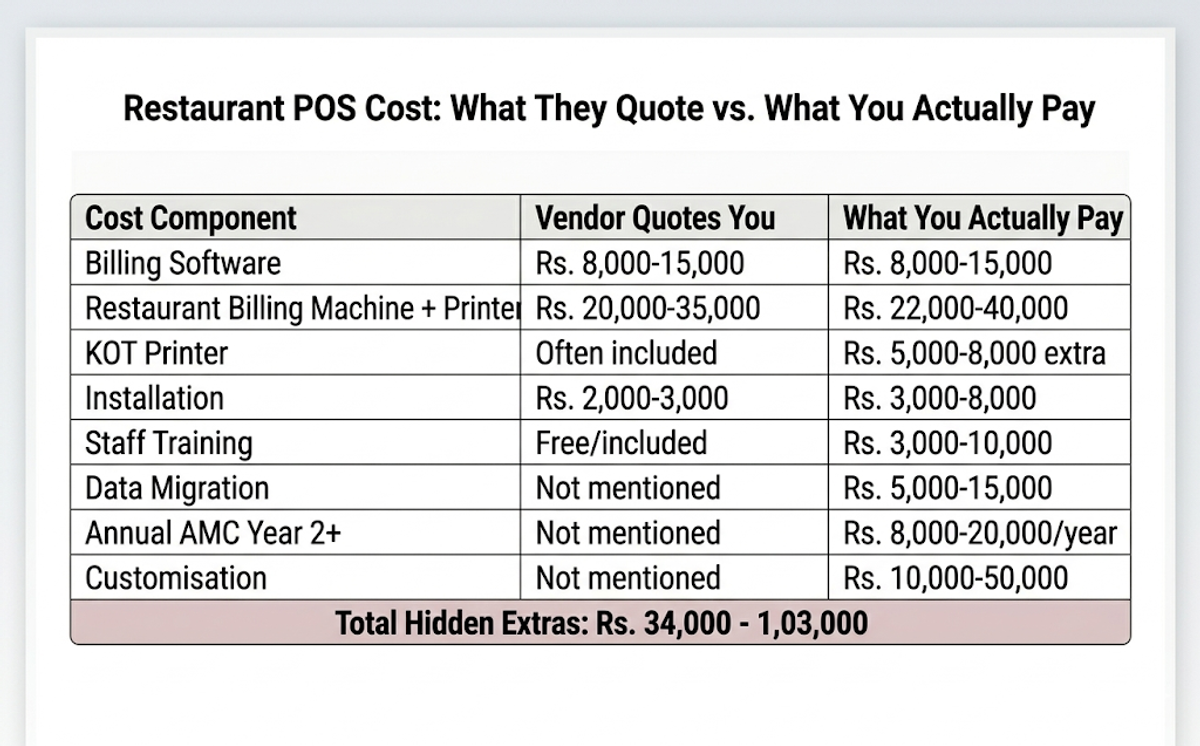
The issue is not that Cafe billing systems are overpriced. The issue is that the number on the first invoice is a fiction. Budget against the real total, not the sales pitch.
The Mistakes That Create the Rs. 50,000 Problem
These are not edge cases. These patterns come up again and again in owner conversations about billing setup regrets. Each one has a simple fix—but only if you know it before you buy.
Mistake 1: Choosing Price Instead of Fit
There is no shortage of affordable billing software for restaurant operations in India—prices start well under Rs. 10,000 a year. But a budget option that skips GST compliance, KOT integration, or offline mode will cost far more in errors and manual fixes than it saves upfront.
A cheap system that causes Rs. 15,000 in billing errors is not affordable. It is expensive with extra steps.
The fix: write down 5 non-negotiable features before you look at a single vendor. Buy against that list, not against the price.
Mistake 2: Not Testing Offline Mode
A cloud based pos system should handle connectivity loss without shutting down. If it cannot take and bill an order without internet, you are one router restart away from paper receipts and a queue of frustrated customers.
The fix: during the demo, ask the vendor to turn off the internet and take an order. If they hesitate or skip it, you have your answer.
Mistake 3: Underestimating Staff Training Time
Restaurants that run 30 hours of sandbox practice before go-live see a 4% transaction error rate on Day 1. Restaurants that skip training see 18%. That difference—across 100 covers a day -- is real billing errors, wrong KOTs, and frustrated customers every single service.
Training is not the vendor's job to do automatically. It is yours to demand explicitly.
The fix: Ask for a sandbox environment before go-live. Every team member needs at least 2 hours of hands-on practice—not a 20-minute walkthrough on launch day.
Mistake 4: Never Asking About Evening and Weekend Support
Most providers offer support Monday to Friday, 9 AM to 6 PM. Your restaurant's worst crisis moments are Friday and Saturday nights between 7 PM and 10 PM. These two facts do not align.
The fix: ask for the support SLA in writing. Specifically: "What is your response time at 9 PM on a Saturday?" A verbal answer is not an answer.
Mistake 5: Skipping Delivery Platform Integration
If your restaurant or cafe is live on Swiggy, Zomato, or ONDC, a pos billing machine for restaurants that does not sync with those platforms means your staff manually enters every online order into the restaurant billing machine. That is 15 to 25 extra entries per hour during a peak service—each one a potential error.
ONDC now has 50,000 restaurants active across 172 cities. A billing setup that cannot sync with delivery platforms is already behind the market.
The fix: confirm delivery platform integration before signing. It should be standard—not a future roadmap item or a paid add-on.
Expensive Does Not Mean Better—It Just Means Harder to Leave
Here is the take that upsets sales teams everywhere: price is not a quality signal in restaurant billing software.
Some of the most consistent complaints about setup complexity, support responsiveness, and AMC surprises come from owners who spent the most. The assumption that top restaurant software must be expensive is a vendor narrative, not a market reality.
Vendor lock-in is a feature for the vendor. It is not a feature for you.
Owners who get billing setup right are not the biggest spenders. They are the most specific questioners. They asked about offline mode, about Year 2 costs, and about support hours. They treated the sales call like an interview -- not like a product demonstration.
Price is what you pay on the first invoice. The rest is what you discover over the next 12 months.
Before You Go Live: The Setup Checklist That Actually Matters
Not 15 steps. Not the vendor onboarding email. This is the short list that determines whether your first live service runs smoothly or sideways.
- Offline mode was tested—not just confirmed verbally. Turn off the internet. Can staff take and bill a full order?
- GST setup verified -- GSTIN entered, CGST/SGST split correct, and sequential invoice numbering confirmed.
- KOT flow tested -- kitchen printer fires before the billing screen confirms the order.
- Staff trained in sandbox— every team member has completed at least 5 dummy transactions before going live.
- Support SLA in writing— evening and weekend response time documented, not verbally promised.
- Delivery integration confirmed—one real test order from Swiggy, Zomato, or ONDC has synced correctly to the billing system.
- Bill printing machine for restaurants tested -- printer queues, fires correctly offline, and connects to the billing system without manual intervention.
- Full cost documented -- AMC from Year 2, migration, customization, and training costs are all on paper before you sign.
What a Well-Set-Up Billing System Actually Feels Like
Nobody writes about this in spec sheets. But it is the only thing that matters when service starts.
Your staff walks up to a table. Taps in the order on the cafe billing machine or counter terminal. Hits send. The kitchen gets the ticket before the staff member has turned around. Food arrives three minutes faster. The bill prints the moment the table asks—GST split correct, payment in 30 seconds, no hovering, and no second device needed.
When billing works right, it is invisible. It only becomes visible when it does not work.
The staff member who was anxious about the new system on Day 1 is using it without thinking by Day 5. Not because the technology is impressive. Because it got out of the way and let them do their actual job.
That is the only thing a billing system should do. Everything else is a feature list.
The Real Reason Owners Stay on Bad Systems Too Long
The most expensive mistake on this list is not buying the wrong system. It is staying on it.
You spent Rs. 40,000 on a hotel billing machine or restaurant setup that frustrates your staff daily. Support is slow. Billing errors happen three times a week. But switching feels painful—re-entering data, retraining staff, and the risk of something going wrong mid-service. So you stay. For six months. A year.
Staying costs more than switching. You just feel it slowly instead of all at once.
Billing errors at Rs. 300 per incident, 15 times a month—Rs. 4,500. Staff overtime from system inefficiency—Rs. 3,000 per month. Manual GST reconciliation—5 hours every month. Over 12 months, that staying decision costs Rs. 90,000 or more on top of the system you already paid for.
The sunk cost of a bad billing system is not the money already spent. It is the money you keep losing by not making the switch.
The Questions Worth Asking Any Billing Software Provider
Before committing to any billing setup—whether it is a cloud based pos system, a dedicated terminal, or a tablet-based cafe billing software—these are the questions that separate a good vendor from one you will regret in Year 2.
- Does the system work fully offline? Show me during the demo—do not tell me.
- Is GST compliance built in from Day 1, or do I configure it myself?
- What does support look like at 9 PM on a Saturday? What is the SLA in writing?
- What does the Year 2 cost look like—AMC, renewals, platform fees?
- Does it integrate with the delivery platforms I am currently live on?
- How long does data migration take, and who handles it?
Any vendor who cannot answer these questions clearly and in writing is giving you a preview of what post-sale support will look like.
The Rs. 50,000 mistake is not about buying the wrong system.
It is about buying without asking the right questions. Trusting a demo over a real-world test. Ignoring costs that only show up on the second invoice.
Owners who get billing setup right are not smarter. They are more suspicious of demos, of quoted prices, of vendors who go quiet after the sale.
Be that owner.